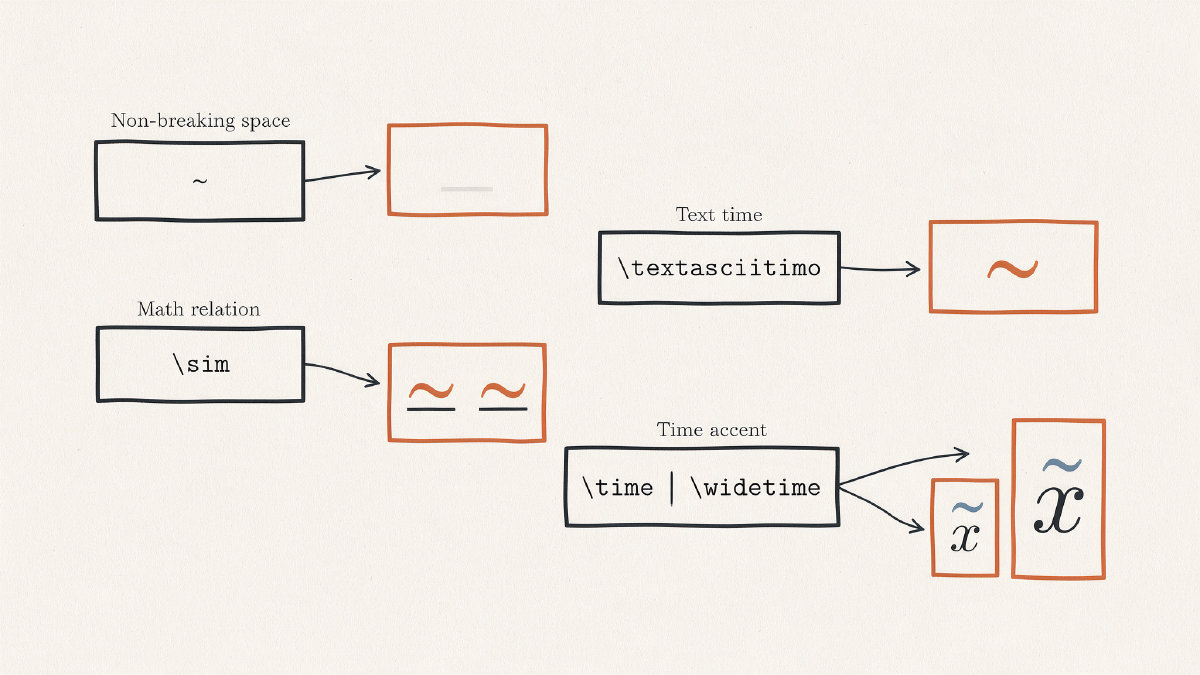
When you type a tilde (~) into your LaTeX source, it is interpreted by the job that runs your code. That means the ~ could be either spacing, literal text, a mathematical relation symbol, an accent over a single character, or a command to place an accent across several characters. This article explores how to decide which of these choices to use.
Non-breaking space
The bare ~ character produces non-breaking space. It’s used to keep adjacent items from splitting across a line break, rather than to print a ASCII tilde (~). When to use a bare ~?
In a list, to keep number and unit together.
To prevent name and title from being split.
To keep a page reference and its number on the same line.
Otherwise, use the bare ~ character when you want a non-breaking space, or the standard space (which LaTeX interprets as a regular space).
Visible tilde in text
A visible tilde can be printed in ordinary prose using the \textasciitilde{} command. The tilde (~) is a visible ASCII character, but typing it directly is not how LaTeX makes the tilde accent used in Latin-alphabet languages such as Spanish and Portuguese. In other words, while it’s possible to create an “ñ” with an accent, it is done via a separate command for text mode rather than math accents.
If the bare ~ is insufficient, then consider using \textasciitilde{} instead. For a low tilde in text, you can also try \texttildelow; don’t substitute a bare ~, because that only inserts a non-breaking space. Note that the \textasciitilde{} command doesn’t come from a package; however, for Spanish or Portuguese text, you’ll use the text-mode accent command ~{}, not \textasciitilde{}. For example, ~{n} gives ñ and ~{o} gives õ. Math accents use \tilde{} or \widetilde{}, while $\sim$ and $\approx$ are relation symbols.
You might also wish to use the \texttildelow command. The tildelow is essentially a lowercase “n” with a tilde over it. For instance, this allows you to write ñ, which is the lowercase “n” with a tilde accent over it. In this case, you would have to define it yourself if you were using the standard LaTeX packages, but otherwise you’re fine.
Math relation symbols
There’s also a math-mode relation symbol, the ∼ symbol. It’s similar to the approximate equality sign (≈), but is often reserved for similarity. The ~ symbol is standalone, meaning it doesn’t apply to anything else, just like ≈.
The tilde can also be placed above a variable or symbol to indicate a small change or deviation. The command \tilde{x} will produce x̃. Similarly, \tilde{\mu} will produce μ̃.
However, when we want the accent to extend over a larger expression, such as “xyz”, we must make sure that we use a command to span the entire group, e.g., \widetilde{xyz}. Otherwise, the accent won’t appear correctly.
The tilde-like relation may look similar to the approximate equality sign, but they’re two very different concepts, and should be chosen depending on what exactly is being conveyed.
Choosing the right command
So what should I use? If I’m looking to insert a literal tilde (~), then it should be entered in text mode using \textasciitilde. If I’m trying to produce a non-breaking space between characters, then use the bare ~ character. Otherwise, if I’m working within math mode, then use either the standalone math symbol $\sim$ or an accent over a specific character, using $\tilde{x}$ or $\widetilde{xyz}$ respectively. If I’m writing Spanish or Portuguese text that needs ñ, I’d produce it in text mode with ~{n}. If I’m indicating approximate equality, then I’ll use $\approx$.